- Forum
- SENSIBLE (WORLD OF) SOCCER
- SWOS 2020
- Using the new PURPLE profile to change other kit colours on the SWOS palette
Using the new PURPLE profile to change other kit colours on the SWOS palette


7 hours 56 minutes ago - 4 hours 53 minutes ago #147231
by Irons79
Hi Everyone,
Just discovered the new SWOS 2020, I'm new on here so hello! Firstly, huge thanks to everyone who brought back this amazing game from my childhood! Many hours of happiness now await me! Playaveli, great YT content, top geezer! Thanks to Kanchelskis and DaniSWOS whose previous posts helped me.
I only saw a few posts about some of the below, so forgive me if it's repetition, common knowledge or if it breaks anything! Feel free to delete it!
Essentially using the brilliant PURPLE profile setup in the GAME LAUNCHER you can edit the other colours in the SWOS palette. Some of the default SWOS kit colours annoyed me for more than 30yrs LOL...saw this opportunity to scratch that itch.
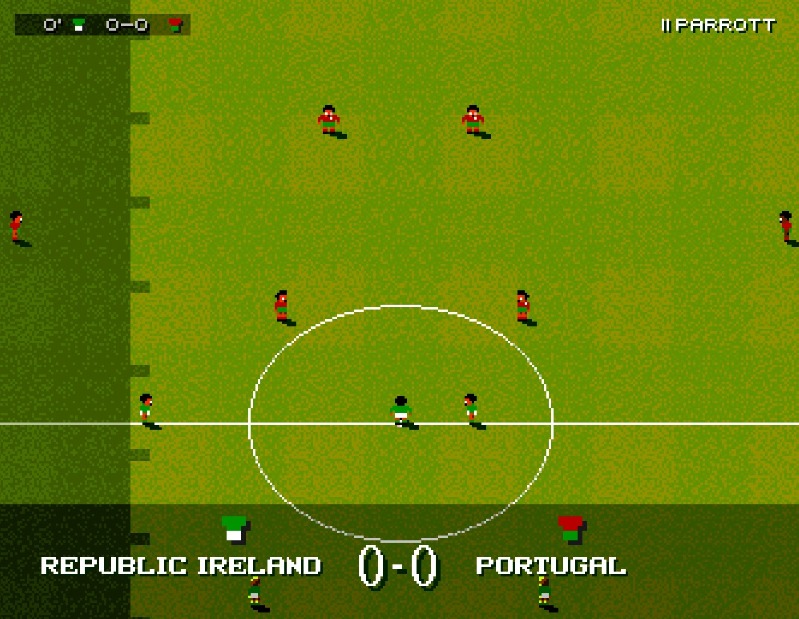
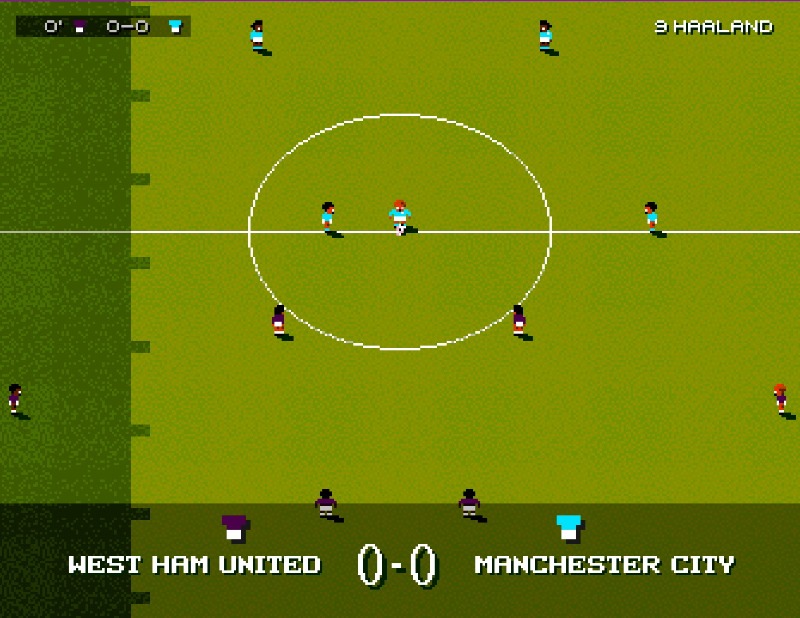
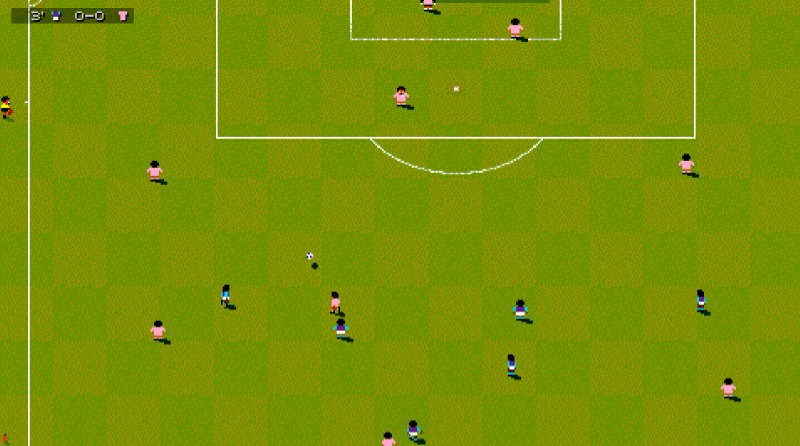
The 2nd NEW COLOUR PALETTE below adjusts some of the colours, ultimately all personal preference though:
- RED: Have made this slightly darker so it not as bright
- GREEN: Have made this slightly darker so it not as bright
- ORANGE: Have made this slightly more a vibrant neon orange a la Netherlands
- BLUE: Have made this slightly darker
- BROWN: I made the new SWOS 2020 purple darker. I feel it covers claret/maroon shirts (West Ham etc) as well purple kits like Fiorentina rather than forcing you into using the non-Purple Original profile in the game launcher. Just my personal preference.
- CYAN: One of my biggest itches lol. Ive always thought it looked quite greyish and not sky blue at all. I changed this to more vibrant cyan tone but lemme know if you get more success
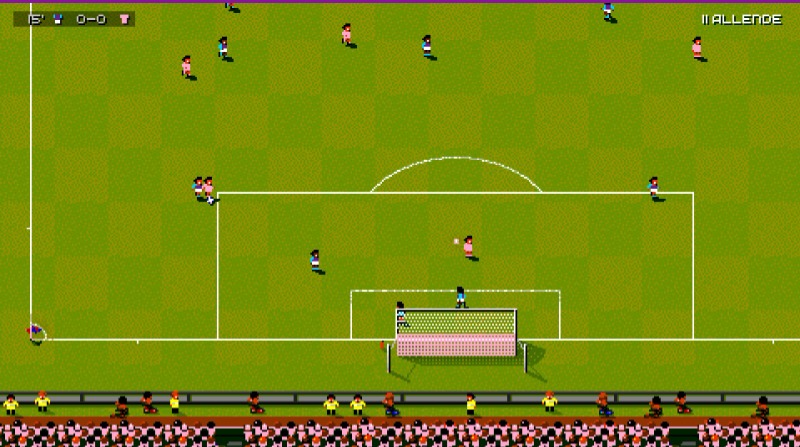
- GREY: This is slightly trickier. I haven't tested all this loads but it seems to be the only colour on the palette that affects other sprites' colour. The goal nets and penalty spots. I changed it to a LIGHT PINK and it's not too bad. Theres a slight pink tint to the BOTTOM goal but its not noticeable anywhere else in game imo. Obviously if you choose another colour, it might look more obvious.
If anyone finds a way of fixing it, lemme know!
FINAL POINTS: the original RGB colour codes are below if you want to roll back. Remember if you select the ORIGINAL PALETTE in the SWOS 2020 game launcher your game session will use the original SWOS colour palette anyways. Also if you do end up replacing GREY with PINK. You'll need to change a pink team's kit to GREY. So in kit menu in-game for INTER MIAMI, change their shirts, shorts & socks to GREY, and on-pitch they will appear all PINK.
Not all the RGB HEX colours work in SWOS, as im assuming it has a more limited range of colours. So you might try to change the LIGHT BLUE to a more vibrant sky blue but it will either come up as a totally different colour like red or not change. Its a lot of trial and error before you find a colour code that will work. Maybe people can post screenshots of any new colours they discover that work?
INSTRUCTIONS:
IMPORTANT: MAKE BACKUP COPIES of the [pal.256, fill_purple.256 and pal_purple.256] files first!
Useful RGB HEX colour list, if you want to experiment with other colours:
www.rapidtables.com/web/color/RGB_Color.html
Download HxD editor and set Window width to 256. You can then easily find the OFFSETS for each colour. Then RIGHT-CLICK and WRITE over that OFFSET and SAVE. Do this on all 3 x *.PAL files below. You may need to only change less but I havent tested that
2 x pal files (fill_purple.256 and pal_purple.256)
C:\Games\SWOS 2020\col_palettes
1 x pal files (pal.256)
C:\Games\SWOS 2020\swos
SWOS2020 - CLASSIC PALETTE
Offset Colour RGB
0xFA03 grey = 262626
0xFA06 white = 3F3F3F
0xFA09 black = 000000
0xFA12 orange = 3F1900
0xFA1E red = 3F0000
0xFA21 blue = 00003F
0xFA24 brown 003F08
0xFA27 cyan = 26263F
0xFA2A green = 003700
0xFA2D yellow = 3F3F00
NEW COLOUR PALETTE
Offset Colour RGB
0xFA03 grey = 262626 PINK = FF69B4
0xFA06 white = 3F3F3F
0xFA09 black = 000000
0xFA12 orange = FF8C00
0xFA1E red = AF0000
0xFA21 blue = 000035
0xFA24 brown = 9400D3
0xFA27 cyan = 0073FF
0xFA2A green = 006400
0xFA2D yellow = 3F3F00
Thanks!
Just discovered the new SWOS 2020, I'm new on here so hello! Firstly, huge thanks to everyone who brought back this amazing game from my childhood! Many hours of happiness now await me! Playaveli, great YT content, top geezer! Thanks to Kanchelskis and DaniSWOS whose previous posts helped me.
I only saw a few posts about some of the below, so forgive me if it's repetition, common knowledge or if it breaks anything! Feel free to delete it!
Essentially using the brilliant PURPLE profile setup in the GAME LAUNCHER you can edit the other colours in the SWOS palette. Some of the default SWOS kit colours annoyed me for more than 30yrs LOL...saw this opportunity to scratch that itch.
The 2nd NEW COLOUR PALETTE below adjusts some of the colours, ultimately all personal preference though:
- RED: Have made this slightly darker so it not as bright
- GREEN: Have made this slightly darker so it not as bright
- ORANGE: Have made this slightly more a vibrant neon orange a la Netherlands
- BLUE: Have made this slightly darker
- BROWN: I made the new SWOS 2020 purple darker. I feel it covers claret/maroon shirts (West Ham etc) as well purple kits like Fiorentina rather than forcing you into using the non-Purple Original profile in the game launcher. Just my personal preference.
- CYAN: One of my biggest itches lol. Ive always thought it looked quite greyish and not sky blue at all. I changed this to more vibrant cyan tone but lemme know if you get more success
- GREY: This is slightly trickier. I haven't tested all this loads but it seems to be the only colour on the palette that affects other sprites' colour. The goal nets and penalty spots. I changed it to a LIGHT PINK and it's not too bad. Theres a slight pink tint to the BOTTOM goal but its not noticeable anywhere else in game imo. Obviously if you choose another colour, it might look more obvious.
If anyone finds a way of fixing it, lemme know!
FINAL POINTS: the original RGB colour codes are below if you want to roll back. Remember if you select the ORIGINAL PALETTE in the SWOS 2020 game launcher your game session will use the original SWOS colour palette anyways. Also if you do end up replacing GREY with PINK. You'll need to change a pink team's kit to GREY. So in kit menu in-game for INTER MIAMI, change their shirts, shorts & socks to GREY, and on-pitch they will appear all PINK.
Not all the RGB HEX colours work in SWOS, as im assuming it has a more limited range of colours. So you might try to change the LIGHT BLUE to a more vibrant sky blue but it will either come up as a totally different colour like red or not change. Its a lot of trial and error before you find a colour code that will work. Maybe people can post screenshots of any new colours they discover that work?
INSTRUCTIONS:
IMPORTANT: MAKE BACKUP COPIES of the [pal.256, fill_purple.256 and pal_purple.256] files first!
Useful RGB HEX colour list, if you want to experiment with other colours:
www.rapidtables.com/web/color/RGB_Color.html
Download HxD editor and set Window width to 256. You can then easily find the OFFSETS for each colour. Then RIGHT-CLICK and WRITE over that OFFSET and SAVE. Do this on all 3 x *.PAL files below. You may need to only change less but I havent tested that
2 x pal files (fill_purple.256 and pal_purple.256)
C:\Games\SWOS 2020\col_palettes
1 x pal files (pal.256)
C:\Games\SWOS 2020\swos
SWOS2020 - CLASSIC PALETTE
Offset Colour RGB
0xFA03 grey = 262626
0xFA06 white = 3F3F3F
0xFA09 black = 000000
0xFA12 orange = 3F1900
0xFA1E red = 3F0000
0xFA21 blue = 00003F
0xFA24 brown 003F08
0xFA27 cyan = 26263F
0xFA2A green = 003700
0xFA2D yellow = 3F3F00
NEW COLOUR PALETTE
Offset Colour RGB
0xFA03 grey = 262626 PINK = FF69B4
0xFA06 white = 3F3F3F
0xFA09 black = 000000
0xFA12 orange = FF8C00
0xFA1E red = AF0000
0xFA21 blue = 000035
0xFA24 brown = 9400D3
0xFA27 cyan = 0073FF
0xFA2A green = 006400
0xFA2D yellow = 3F3F00
Thanks!

Last edit: 4 hours 53 minutes ago by Irons79.
Please Log in or Create an account to join the conversation.
- Forum
- SENSIBLE (WORLD OF) SOCCER
- SWOS 2020
- Using the new PURPLE profile to change other kit colours on the SWOS palette
Time to create page: 0.146 seconds